
Custom-UI course
Sales Excellence
A sales course built around a custom-designed course menu — replacing the stock Storyline player entirely.
Concept project — self-directed, built to a fictional client brief
- Articulate Storyline 360
- Figma
- Screens
- 20
- Topics
- 2
- Exit ticket items
- 4
- Menu states
- 7
The brief
Storyline's built-in player sidebar works, but it looks like Storyline and it can't show what a learner has finished. This build replaces it: the navigation is designed from scratch as part of the course, so the menu carries progress, completion and brand instead of sitting beside them.
Learning objectives
- Structure a sales pitch that connects with an audience and addresses stated needs rather than listing features.
- Handle a negotiation without conceding the value of the offer.
- Close a deal and carry it through to customer satisfaction after the signature.
Design decisions
The menu is the project
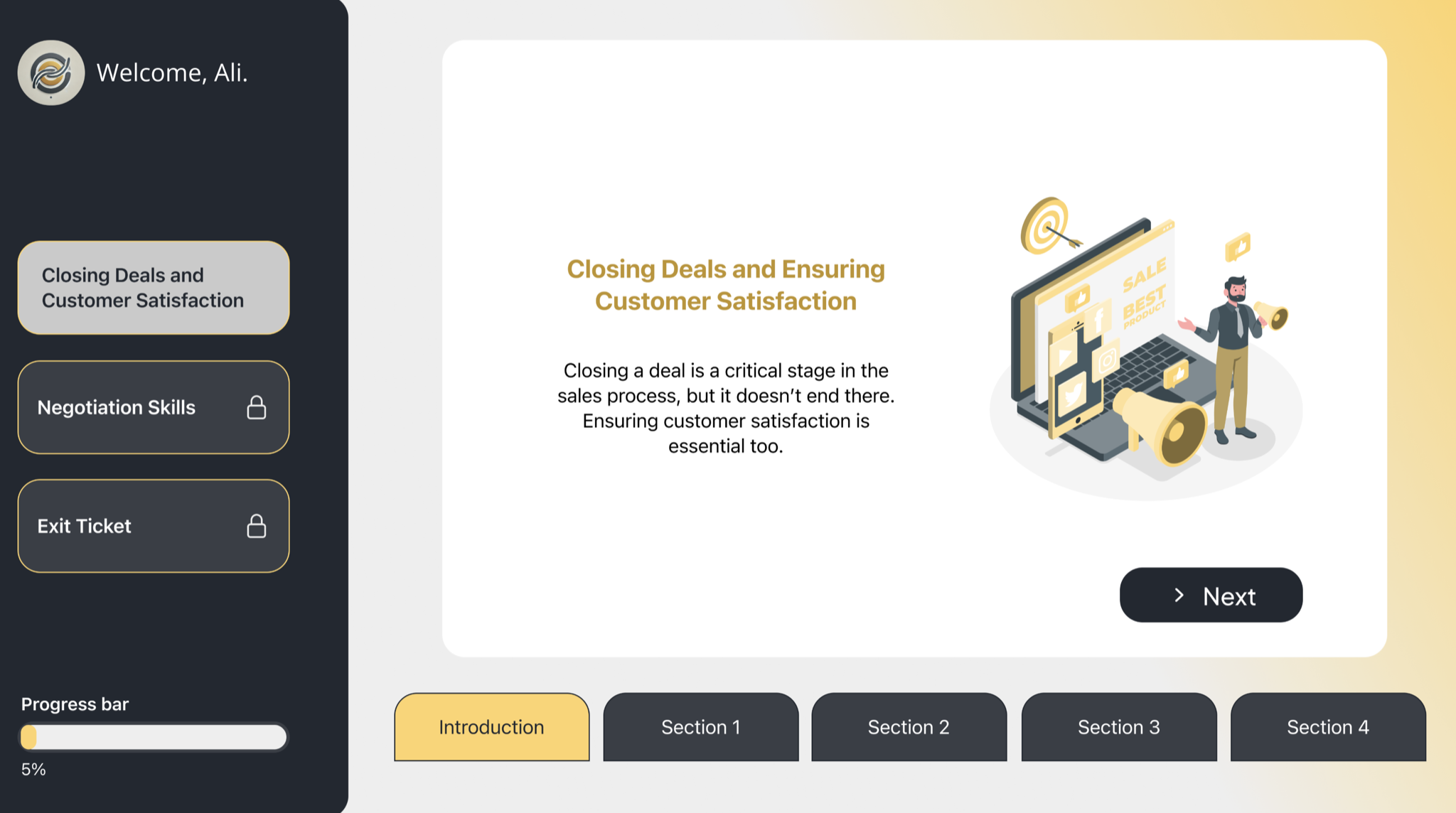
A custom left-hand menu built as a Figma component set with seven states — default, hover and selected, each with a matching completed-icon variant — plus a progress bar. It shows where the learner is, where they've been and what's left, which the stock player sidebar cannot do. The Storyline player chrome is switched off entirely.
Name capture, then use it
The course asks "What is your first name?" on the second screen and stores it in a variable. Every screen after that carries "Welcome, [name]" in the menu. Small touch, but it changes the register from courseware to something addressed to a person.
Two topics, one shape
Negotiation Skills and Closing Deals each run five screens with an identical structure — an intro that frames why the topic matters, then four content screens. Predictable pacing means the learner spends attention on the content rather than on working out where they are.
Exit ticket, not a final exam
Four questions at the end, framed as an exit ticket rather than a test, with encouraging between-item feedback ("You did it! Let's go to the next question."). The intent is to close the loop and confirm the takeaway, not to sort learners.
Walkthrough
Introduction and name entry
Sets the premise and captures the learner's first name for use throughout.
Negotiation Skills
"A successful sales pitch is the cornerstone of any sales process… it's about connecting with your audience, addressing their needs, and persuading them that you offer the best solution." Intro plus five screens.
Closing Deals and Ensuring Customer Satisfaction
"Closing a deal is a critical stage in the sales process, but it doesn't end there." Intro plus five screens on closing and post-sale care.
Exit ticket and certification
Four questions — the first asks the primary goal when closing a deal — then a printable completion screen.
Build notes
- Custom menu built as a Figma component set with seven interactive states and a progress indicator; native Storyline player chrome disabled.
- Text-entry variable drives personalised greeting on every subsequent screen.
- Per-item conditional feedback on the exit ticket.
- Printable certificate wired through Storyline's print-results prompt.
- Dark and gold palette applied consistently across all 20 screens.
Assessment
A four-item exit ticket at the close, with feedback between items. Completion is tracked in the menu itself — each finished section switches to its done-state icon, so the learner's own progress display doubles as the completion record.